
FSC Application Search Telangana – Check Your Ration Card Status Online
Tracking your Food Security Card (FSC) or ration card application in Telangana is now easier than ever. The EPDS Telangana portal allows residents to check FSC card status, download their card, or verify application details using Aadhaar, MeeSeva, or application number.
This online facility helps families stay informed about their FSC progress, avoid delays, and ensure uninterrupted access to subsidized food grains under the Public Distribution System (PDS).
Quick Tip: Keep your FSC reference number, Aadhaar number, and MeeSeva receipt ready for faster results.
FSC Search Telangana – What is FSC Application Search and Why It Matters
The FSC Application Search Telangana feature, available through the Electronic Public Distribution System (EPDS), enables residents to verify their ration card status online.
The Food Security Card (FSC) is vital for every household in Telangana, especially for low-income families. It helps you:
- Receive 5 kg of subsidized rice per family member per month.
- Access government welfare programs like Mahalakshmi and Rythu Bharosa.
- Use as proof of residence and identity.
- Ensure long-term food and economic stability.
Regularly checking your FSC card status online helps track approvals, detect issues early, and prevent benefit interruptions.
Ways to Perform FSC Ration Card Search in Telangana
There are multiple ways to perform FSC ration card search Telangana using different IDs or details. Here’s a complete guide:
Step 1: FSC Search with Aadhaar Number (UID Search Telangana)
You can quickly check your FSC card status by entering your Aadhaar number on the EPDS Telangana portal.
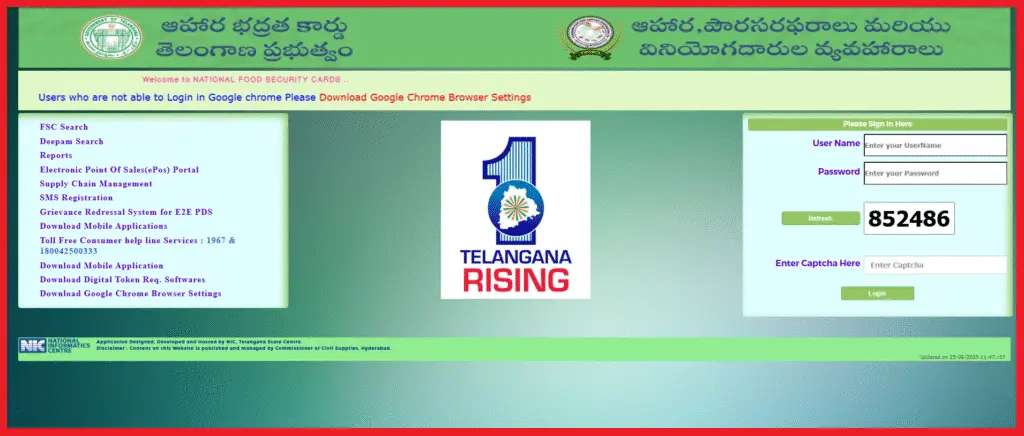
- Visit epds.telangana.gov.in
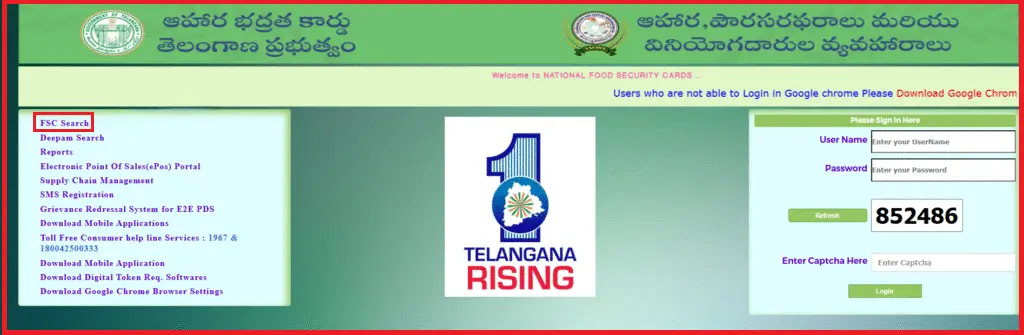
- Select “FSC Application Search.”
- Choose the Aadhaar/UID option.
- Enter your Aadhaar number and district name.
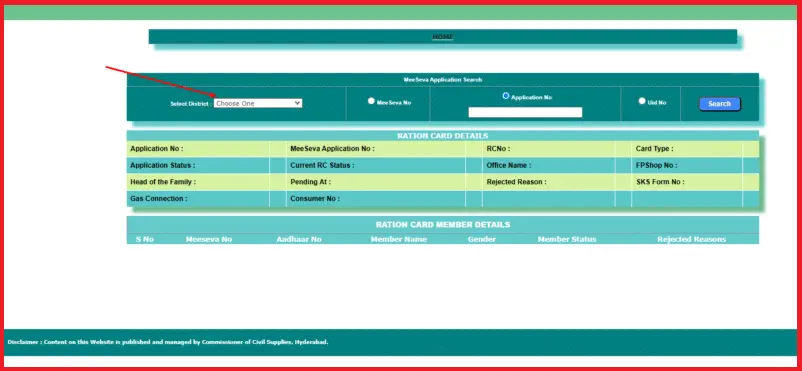
- Click Search to view your status.
This method is ideal if you misplaced your MeeSeva receipt or don’t have your application number
Step 2: FSC Application Search via MeeSeva Portal
If you applied through MeeSeva, you can track your Telangana FSC application using your MeeSeva number:
- Go to the EPDS Telangana portal.
- Select FSC Application Search.
- Choose MeeSeva Number as the search method.
- Enter your MeeSeva number and select your district.
- Click Search to view application progress.
Step 3: Check FSC Status Using Application ID
If you have your original application ID, this method provides detailed status updates, including approval or pending stages.
- Visit the official EPDS portal.
- Choose FSC Application Search.
- Select Application Number as the method.
- Enter your ID and district.
- Click Search to view detailed FSC ration card status.
Step 4: District-Wise FSC Search via EPDS TS Portal
If you don’t have your Aadhaar or application number, you can search district-wise using family details.
- Go to the EPDS Telangana website.
- Select District-Wise FSC Ration Card Search.
- Enter details like head of family name and district.
- View and download your ration card details.
New FSC Application Search and Status Check
For those applying for a new FSC card, tracking the application is crucial to avoid delays. Telangana offers online tools to help new applicants confirm their approval status.
- Use your MeeSeva number or Aadhaar number to check updates.
- Track processing stages like verification, approval, or rejection.
- Once approved, download your e-ration card directly from the portal.
Step-by-Step Guide: How to Perform FSC Application Search
Follow these steps carefully to check your ration card status:
- Visit the EPDS Telangana portal – epds.telangana.gov.in.
- Click on “FSC Application Search.”
- Choose your preferred search method:
- Aadhaar Number
- MeeSeva Number
- Application ID
- Enter the required details correctly.
- Select your district name.
- Hit Search to view your FSC details.
- FSC Card Download if your application is approved.
FSC Application Status Messages Explained
Here’s what each status means and what you need to do:
| Status | Meaning | Action Required |
|---|---|---|
| Under Review | Application is being processed | Wait for further updates |
| Approved | FSC card issued successfully | Download or collect the physical card |
| Rejected | Documents missing or incorrect | Resubmit with corrections |
| Pending Documents | Additional documents required | Upload or submit missing documents |
| Under Verification | Field verification in progress | Check again in 2–3 days |
Troubleshooting FSC Search Issues
Even with an easy system, you might face occasional issues. Here’s how to fix them:
1- No Records Found Error
- Double-check application or Aadhaar number.
- Make sure you selected the correct district.
- Wait 24–48 hours if you applied recently.
- Try an alternative search method, like Aadhaar.
2- Website Not Loading
- Clear browser cache and cookies.
- Switch to another browser like Chrome or Edge.
- Use the site during off-peak hours.
- Ensure you have a stable internet connection.
3- Application Rejected
- Log in and check the rejection reason.
- Update missing or incorrect documents.
- Reapply via MeeSeva or local civil supplies office.
Documents Needed for FSC Application in Telangana
Prepare these documents before applying or checking your FSC status:
- Aadhaar card of each family member.
- Proof of residence (utility bill, rent agreement, etc.).
- Passport-size photographs of all members.
- Income certificate, if required.
- Old ration card number (for updates or corrections).
What to Do After FSC Approval
Once your application is approved, you can access your ration card in two ways:
Step 1: Download e-Ration Card
- Visit the EPDS portal.
- Enter your approved application details.
- Save the digital copy or access it via DigiLocker.
Step 2: Collect Physical FSC
- Visit your nearest Fair Price Shop or civil supplies office.
- Bring original ID documents for verification.
- Receive your printed ration card.
FAQs – FSC Application Search Telangana
How can I check my FSC application without an application number?
You can use your Aadhaar number or visit your district civil supplies office with ID documents.
How long does it take to get a new FSC card approved?
Processing typically takes 15–30 days, depending on document verification.
What should I do if my FSC application is rejected?
Check the reason online, correct errors, and reapply via MeeSeva or your local Mandal office.
Can I track FSC status using Aadhaar only?
Yes, Aadhaar-based searches are supported on the EPDS portal.
Is e-KYC mandatory for FSC?
Yes, complete e-KYC before June 30, 2025 to prevent disruption of ration benefits.
Start Your FSC Application Search Today
Stay informed and secure your family’s benefits by checking your ration card status online. Whether you use Aadhaar, MeeSeva, or application number, the EPDS Telangana portal makes it quick and simple.
Check now and ensure your household receives uninterrupted access to essential food supplies.