
FSC Search with Aadhaar No Telangana – Check Your Ration Card Status Online
The FSC Search with Aadhaar No Telangana service allows you to check your ration card details, application status, and family information online through the official EPDS Telangana portal. This feature enables residents to verify their Food Security Card (FSC) more easily, eliminating the need to visit government offices or wait in queues.
Whether you have applied for a new ration card or want to check the status of an existing one, this guide provides clear, step-by-step instructions to help you search and download your FSC details securely.
Understanding FSC Search with Aadhaar No Telangana
The Food Security Card (FSC), also known as a ration card, is a crucial government-issued document under the Public Distribution System (PDS). It enables families to access subsidized food grains and other essentials under the National Food Security Act (NFSA).
By linking your Aadhaar number with your FSC, you can:
- Verify ration card details instantly.
- Ensure transparency in benefits distribution.
- Prevent duplicate or fake cards.
- Simplify future online applications and updates.
Types of Ration Cards in Telangana
When performing an FSC search, you will see your ration card type. Telangana issues different FSC types based on income and eligibility:
| Card Type | Eligibility | Benefit |
|---|---|---|
| AAY (Antyodaya Anna Yojana) | Poorest of the poor households | The highest food subsidy |
| PHH (Priority Household) | Low-income families eligible under NFSA | Regular subsidized grains |
| White Card (APL) | Above Poverty Line families | Limited benefits |
Knowing your FSC type helps you understand the exact benefits your household is entitled to receive.
Step-by-Step Guide: FSC Search with Aadhaar No Telangana
Here’s how you can check your FSC details using Aadhaar online:
Step 1: Visit the EPDS Telangana Official Portal
- Open epds.telangana.gov.in on your mobile or computer.
- Make sure the URL ends with
.gov.into ensure authenticity.
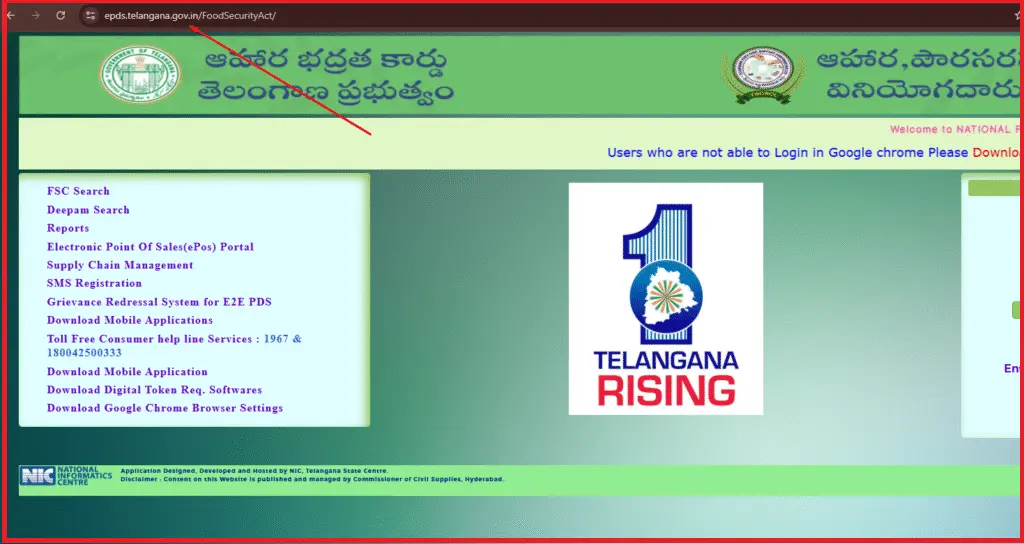
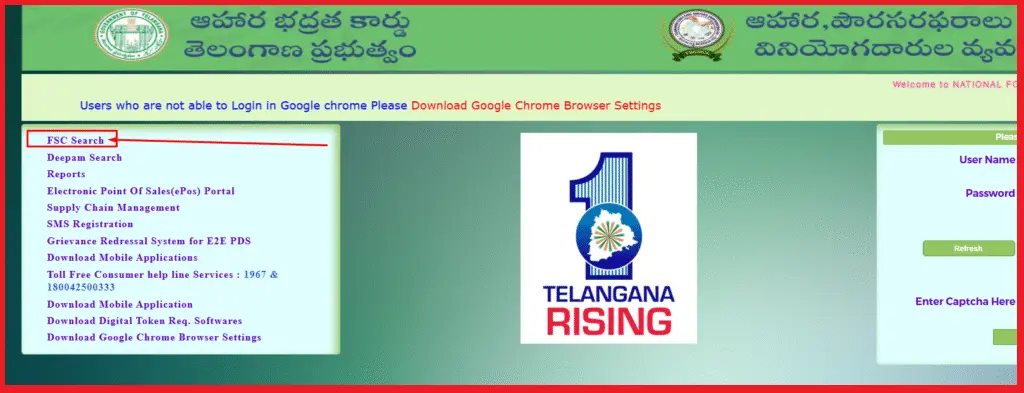
Step 2: Go to the FSC Search Section
- From the homepage, click on “FSC Search” in the main menu.
- This section allows you to find ration card details through different methods.
Step 3: Select “Search by Aadhaar Number”
- Choose “FSC Search with Aadhaar No” from the list of search options.
- This method works only if your Aadhaar is already linked to your ration card.
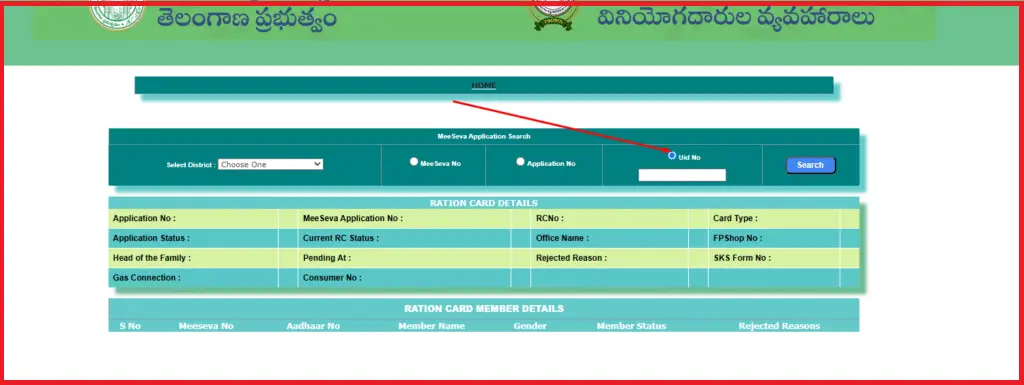
Step 4: Enter Aadhaar Number and District
- Enter your 12-digit Aadhaar number carefully.
- Select your district from the drop-down menu (e.g., Hyderabad, Warangal, Karimnagar).
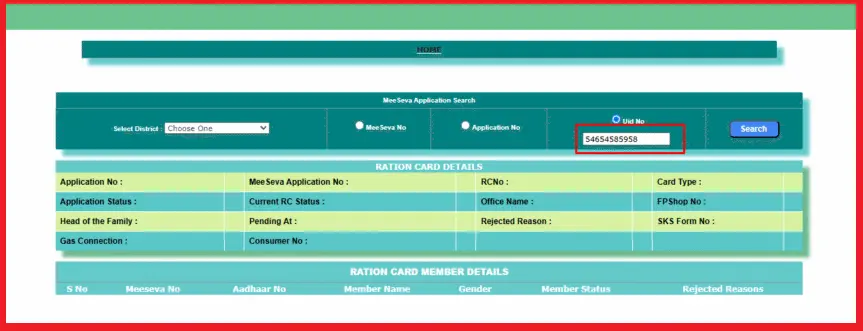
Step 5: Click Search and View Details
- Click on “Search” to process your request.
- Your FSC details will appear on the screen, including:
- Ration card number and type
- Names of family members
- Application status (Approved, Pending, Rejected)
- Fair price shop details
Pro Tip: If details are missing or incorrect, visit your nearest MeeSeva center to update your FSC records.
Step 6: Download or Print FSC Information
- Use the download option to save a copy of your FSC for future reference.
- A printed copy can be used for official verifications.
Benefits of Using Aadhaar for FSC Search
Searching your FSC using Aadhaar offers several advantages:
- Instant Access: Quick verification without visiting offices.
- Accurate Results: Aadhaar ensures correct matching of records.
- Fraud Prevention: Stops duplicate ration cards.
- Transparency: Track your application status in real-time.
- Convenience: Check from anywhere, 24/7.
Common Problems and Solutions
| Issue | Possible Reason | Solution |
|---|---|---|
| Aadhaar not linked | Aadhaar not registered with ration card | Visit MeeSeva center to link Aadhaar |
| Wrong details shown | Mismatch between Aadhaar and FSC data | Update Aadhaar or FSC records |
| OTP not received | Mobile number not linked with Aadhaar | Link mobile with Aadhaar at UIDAI center |
| Portal not loading | High traffic or server issue | Try during off-peak hours or clear cache |
Additional Services on EPDS Telangana Portal
Apart from FSC Search by Aadhaar, the portal offers:
- FSC Application Search – Check the status of your new ration card application.
- Rejected FSC List – Find out if your application was rejected and why.
- LPG Subsidy Details – Verify Deepam scheme benefits.
- ePoS Transactions – Track ration distribution at fair price shops.
- Download E-Ration Card – Get a digital copy for easy access.
Important Guidelines for FSC Search Users
- Ensure your Aadhaar is linked with your ration card before using the service.
- Always use the official EPDS Telangana website to avoid fraud.
- Keep your Aadhaar and FSC numbers confidential for security.
- For technical issues, contact the EPDS helpline:
- 1967 or 1800-4250-0333
Helpline and Contact Details
For assistance, use these official contact points:
- Address: Civil Supplies Bhavan, Somajiguda, Hyderabad – 500082
- Toll-Free Numbers: 1967 / 1800-4250-0333
- Email Support: pmu_pm_cs@telangana.gov.in
Frequently Asked Questions
What is FSC Search with Aadhaar No in Telangana?
FSC Search with Aadhaar No is an online service on the EPDS Telangana portal that allows residents to check their Food Security Card (FSC) or ration card details using their Aadhaar number. It helps track application status, verify card information, and access subsidy services.
How can I check my ration card by Aadhaar number in Telangana?
Visit epds.telangana.gov.in, go to FSC Search, select Search by Aadhaar Number, enter your Aadhaar and district, then click Search to view details.
Can we get ration with an Aadhaar card?
Yes, if your Aadhaar is linked to your ration card, you can get subsidized food grains through biometric verification at Fair Price Shops.
How to check Praja Palana status by Aadhaar number?
Go to the official Telangana portal, open Praja Palana Status, enter your Aadhaar or application ID, and click Submit to check status.
How to search for new ration card status in Telangana?
On epds.telangana.gov.in, click FSC Application Search, enter Aadhaar or application number, select district, and click Search.
Final Thoughts
The FSC Search with Aadhaar No Telangana service simplifies the way citizens access ration card details and track application statuses. By using the official EPDS Telangana portal, you can ensure your family’s eligibility for essential government benefits under the Public Distribution System — anytime, anywhere.